Rental Instructions
Everything you need to drive your Eco Planeta rental golf cart: set up the Eco Planeta IQ app, share keys with your group, turn the cart on and off, and charge it overnight.
Set Up the Eco Planeta IQ App
Our golf carts have no physical keys. Your phone is the key: the Eco Planeta IQ app locks and unlocks the cart, shares access with others and shows where the cart is parked. Everyone who wants to drive needs the app and an account, so please set it up before your rental starts.
- 1
Download the app
Get Eco Planeta IQ from the Apple App Store or Google Play. The download links are at the bottom of this page.
- 2
Create your account
Open the app, enter your email address and choose a password.
- 3
Verify your email
Enter the verification code we send to your email address. No email? Tap 'Resend code' and check your spam folder.
- 4
Turn on persistent login
After your first login, the app asks you to set up persistent login. Tap Enable Now, then Persistent Login, and choose a PIN or biometrics (Face ID or fingerprint). You then no longer need your password every time you open the app.
- 5
Check your garage
Your garage shows the vehicles shared with you. Until your rental cart is shared with you, you will see a demo vehicle.
Share Keys With Family and Friends
When you rent a golf cart you receive a Renter Key, shown in the top left corner of the vehicle screen. With a Renter Key you can give Driver Keys to everyone in your group. Ask them to create their own Eco Planeta IQ account first.
- 1
Open the vehicle
Tap the golf cart in your garage, then tap the key button in the top right corner. This screen lists everyone who has a key.
- 2
Add a person
Tap the button in the top right corner to create a new key and enter the email address of the person you want to share it with.
- 3
Choose the key type and duration
Select Driver Key. Make it permanent, so it lasts until you revoke it, or set an end date and time after which it expires automatically.
- 4
Tap Share
The cart now appears in the other person's garage. If they have no account yet, they get an email asking them to create one first.
- 5
Revoke a key when needed
To take a key back, select the person in the shared overview and stop sharing.
Lock and Unlock the Golf Cart
Safety first: never lock or unlock a golf cart while it is moving. Only lock or unlock a cart that is parked in front of you.
- 1
Select your golf cart
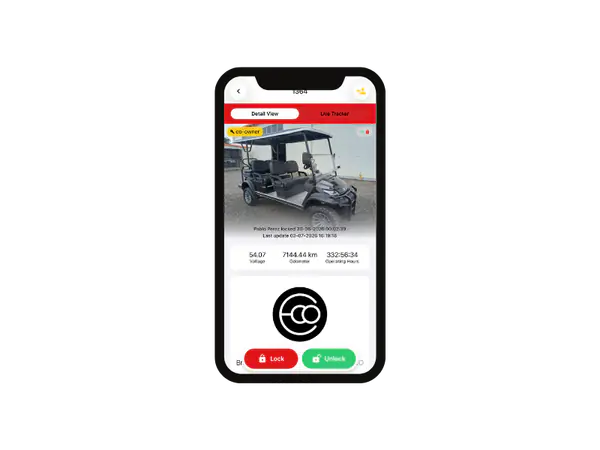
Open Eco Planeta IQ and tap the golf cart you want to use in your garage.
- 2
Unlock or lock
Tap green to unlock the cart and red to lock it.
How to Turn the Golf Cart On
Most of our carts are switched on with the Eco Planeta IQ app. If your cart still uses a physical key, our team will tell you before your rental starts.
- 1
Set the switch under the seat to RUN
The switch below the driver's seat must be on RUN before you can drive.
- 2
Put the dashboard switch in neutral
Set the forward and reverse switch on the dashboard to neutral before you turn the cart on. If it is not in neutral, the cart will not move forward or in reverse.
- 3
Turn the cart on
Unlock the cart in the Eco Planeta IQ app, or turn the key if your cart has one.
- 4
Release the parking brake
Press the brake pedal all the way down and let it come back up, until it is level with the accelerator. You can also simply press the accelerator: carts with an automatic parking brake release it as soon as you do.
How to Turn the Golf Cart Off
- 1
Set the parking brake
Press the brake pedal all the way down until it clicks and stays down. On the ECO Sport the parking brake engages automatically when you switch the cart off.
- 2
Put the dashboard switch in neutral
Always set the dashboard switch to neutral before you turn the cart off.
- 3
Turn the cart off
Lock the cart in the Eco Planeta IQ app, or turn the key if your cart has one.
- 4
Before charging, set the switch under the seat to OFF
The switch below the driver's seat must be OFF while the cart is charging.
How to Charge the Golf Cart
Drive during the day and evening, and charge overnight. An empty battery takes about 10 hours to charge fully. Avoid driving somewhere on a low battery and topping up there for a short time: you risk not making it back, and it shortens the life of the battery.
- 1
Switch the cart off
Follow the steps above and make sure the switch under the seat is set to OFF.
- 2
Connect the charger
Plug the charger cord into a household power socket, then connect the other end to the charging socket below the driver's seat.
- 3
Check the charging light
A blinking yellow light means the cart is charging. A green light means the battery is full.
- 4
Unplug when the light is green
Only disconnect and drive once the charger shows green. Keep the charger out of the rain.
Troubleshooting
There are no lights on the charger after I plug it in. What should I do?
Check that the cable is firmly connected at both ends: the power socket and the cart. Then test the socket with another device, such as a phone charger. If the socket does not work, contact the administrator of your house or villa.
The charger lights are on, but the battery is still low after hours of charging. Why?
A full charge takes up to 10 hours, so it may simply need more time. It is also possible that someone used the cart while it was plugged in. Always check that the charger shows green before you drive.
The golf cart does not move when I press the accelerator. What is wrong?
Check that the switch under the seat is on RUN, that the cart is unlocked in the Eco Planeta IQ app and that the parking brake is released. Then set the dashboard switch to neutral, turn the cart off and on again, and select forward or reverse.
I cannot see my rental golf cart in the app. What should I do?
Make sure you are logged in with the email address you gave us when you booked. If you still only see the demo vehicle, email us at info@ecoplaneta.com and we will share the cart with you.
Can someone else in my group drive the golf cart?
Yes. As the renter you can share a Driver Key with anyone who has an Eco Planeta IQ account. See Share Keys With Family and Friends above.
Who do I contact if I have a problem during my rental?
Email us at info@ecoplaneta.com and we will help you as quickly as possible.
Download Eco Planeta IQ
You need the app to drive your rental golf cart. Download it before you arrive, create your account and you are ready to go.
Learn More About IQ